
Create your first prompt
This example asks the operator to empty the chip tray and reports when they select Done.
Create the catalog
Section titled “Create the catalog”Create prompts.yaml beside the machine’s HAL configuration. The file follows
the prompt catalog schema:
version: 1
hal:  component: ctrl_prompt
prompts:  chip-tray:    hal:      pins:        show:          direction: in          type: bit          trigger: rising
        completed:          direction: out          type: bit          on_action:            done: true
    title: Empty the chip tray    message: Empty the chip tray, reinstall it, and select Done.    severity: warning
    actions:      - id: done        label: Done        intent: primary
    allow_abort: true
The catalog has three top-level entries:
| Entry | Purpose |
|---|---|
version |
Selects version 1 of the catalog format. |
hal.component |
Sets the namespace for the generated HAL component. |
prompts.chip-tray |
Defines the prompt, its content, and its HAL pin contract. |
Only a name under prompts becomes an available prompt instance. This one is named chip-tray.
Start the broker
Section titled “Start the broker”Load the catalog from the machine HAL configuration:
loadusr -W ctrl_prompt --schema=prompts.yamlThe broker validates the catalog and creates all configured pins before the HAL component becomes ready. If prompts.yaml is not beside the HAL file that loads it, pass the correct path for the machine configuration.
Restart LinuxCNC after changing the catalog. The broker is intentionally started by the machine HAL file; it is not systemd-activated. Its ctrl.prompt.v1 gRPC service listens on 127.0.0.1:50053 by default.
Connect the machine logic
Section titled “Connect the machine logic”The example creates these pins:
| Pin | Direction | Purpose |
|---|---|---|
ctrl_prompt.chip-tray.show |
Input | Submits the prompt on a rising edge. |
ctrl_prompt.chip-tray.completed |
Output | Becomes true after the operator selects done. |
Connect the machine’s request logic directly to show, and use completed where the machine sequence needs the acknowledgement. The integrator chooses the machine-owned signal names.
The complete pin name is assembled as component.instance.pin:
ctrl_promptcomes fromhal.component;chip-traycomes from the configured prompt name; andshoworcompletedcomes from the pin declaration.
Exercise one request
Section titled “Exercise one request”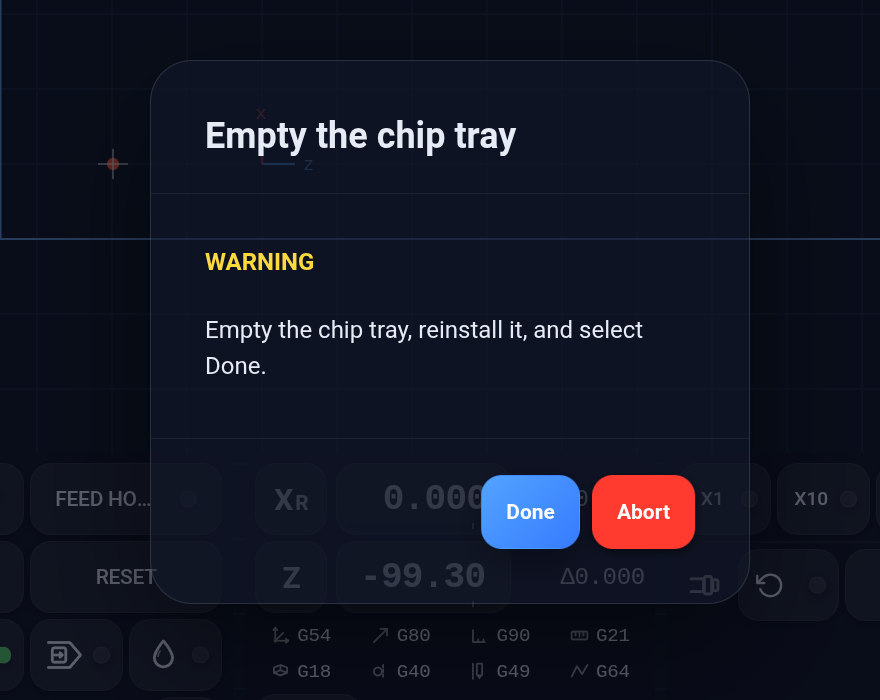
Follow this sequence from machine logic or a HAL testing tool:
- Confirm
showis false andcompletedis false. - Set
showtrue. The rising edge submits the request. - Keep
showtrue while the prompt is pending or active. - Select Done.
completedbecomes true. - Read the result, then set
showfalse.completedresets to false and the request is released.
If the operator aborts, completed remains false. The machine logic must still lower show before it can submit a new request.
If show falls before the operator answers, the broker cancels and releases the request. Holding show high after that does not resubmit it; a new request requires another falling-to-rising transition.